Google Search Console tells you how many clicks, impressions, and ranking positions a page receives. Your content monitoring tool tells you when the title, H1, or canonical changed. But these two data streams live in separate products — which means you can see a click drop without knowing what caused it, and you can publish a title rewrite without knowing whether it moved the needle. 2-UA's Search Console integration overlays both on the same timeline, both for the whole site and for each tracked URL.
What is imported from Google Search Console
Once connected, 2-UA imports the following daily per-URL metrics from Google Search Console's Search Analytics API:
- Clicks — how many times a user clicked your result in Google Search
- Impressions — how many times your page appeared in search results
- CTR — click-through rate (clicks ÷ impressions)
- Average Position — mean ranking position across all queries where the page appeared
Data is imported every night for the previous day. The import covers all tracked URLs — no need to configure each page separately. One connection per site covers the entire site.
Two chart levels: site-wide and per URL
2-UA shows Search Console performance at two levels so you can move from a broad traffic signal to the exact URL that changed:
- Site → Search Console shows the whole tracked site: summary cards, site-wide trends, and the top pages table.
- URL → Quick menu → Search Console shows the same metrics for one tracked URL, with that URL's own content-change markers.
The site-wide view is useful for spotting broad changes: a crawl template update, site-wide title pattern change, indexing shift, or deploy that affected many pages. The URL view is better for debugging one page: title rewrites, H1 edits, canonical changes, redirects, or page-specific content updates.
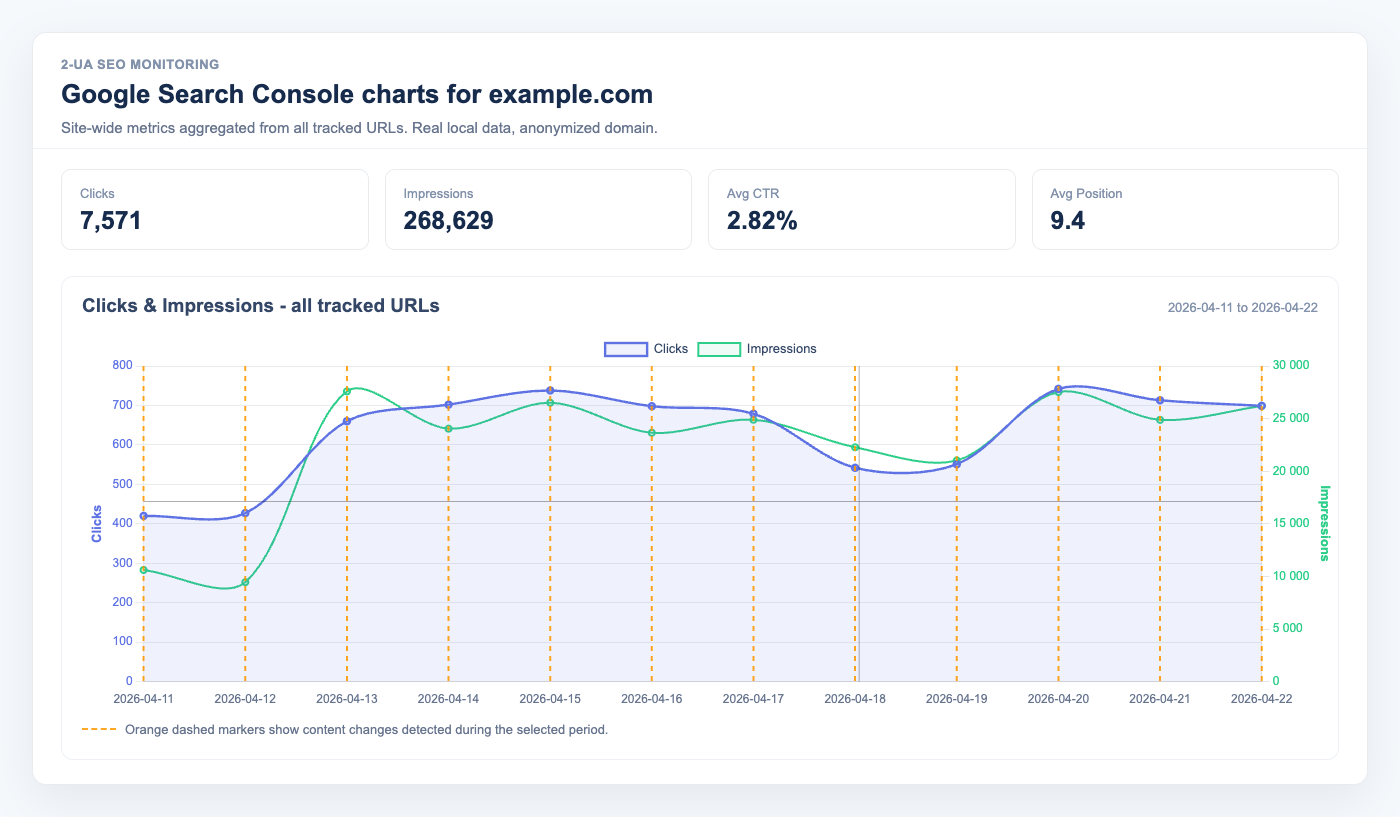
How to read the GSC charts
Both the site-wide and per-URL Search Console pages include two charts:
- Clicks & Impressions — clicks use the left axis, impressions use the right axis. This keeps clicks readable even when impressions are much larger.
- CTR & average position — CTR uses a percentage axis, and average position is inverted so higher movement means better rankings.
The chart cursor draws a vertical and horizontal guide line, similar to a response-time monitoring chart. This makes it easier to compare the selected date with both axes at once, especially when clicks and impressions use different scales.
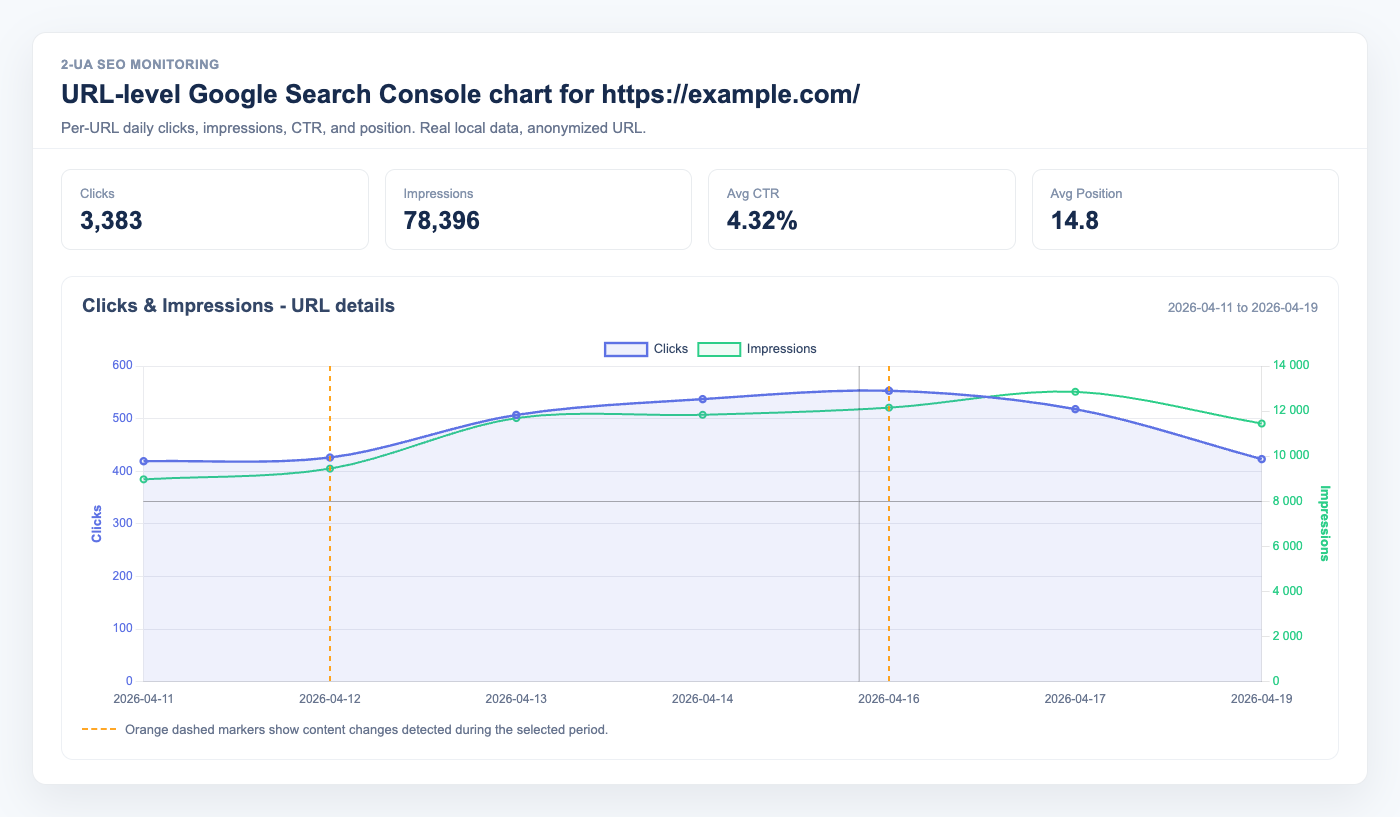
Orange vertical markers show dates when 2-UA detected content changes. If there are only a few change dates, the chart labels them as Content change. If there are many change dates, labels are hidden and only the vertical markers remain, so the chart stays readable.
How site-wide metrics are calculated
On the site-wide Search Console page, daily clicks and impressions are summed across tracked URLs.
CTR is calculated as total clicks ÷ total impressions, not as a simple average of page CTR values.
Average position is weighted by impressions, which makes the site-level line closer to how Search Console reports performance for a property.
This distinction matters. A page with 10 impressions should not influence the site-wide position as much as a page with 10,000 impressions. Weighting by impressions keeps the chart useful for real SEO decisions instead of letting low-volume URLs distort the trend.
Content changes as timeline events
Every time 2-UA detects a content change on a tracked URL — a different title, a new canonical tag, a changed H1 — it records that event. On the Search Console chart, those events appear as vertical markers. You see exactly where on the clicks and CTR curve the change happened.
Example scenarios this makes visible:
- You rewrote the title on 3 March. Clicks jumped 40% in the following week. The marker confirms the timing.
- A CMS update silently removed the H1 on 12 April. Impressions fell sharply the next day. The marker identifies the cause.
- A redirect was changed, and the canonical tag shifted. Position dropped. The marker ties it to the deploy.
How to connect
- Open any tracked URL → Quick menu → Search Console.
- Click Connect Google Search Console.
- Sign in with a Google account that has Owner or Full User permission for the site in GSC.
- Approve access. 2-UA stores only an offline refresh token — it never reads your emails or any data outside Search Console.
- Data appears the next morning after the nightly import.
You can also navigate to Site → Search Console to see site-wide charts and a top-pages table ranked by total clicks.
Position chart and why it is inverted
The average position chart uses an inverted Y-axis: position 1 (top of search results) is at the top of the chart, and position 50 is at the bottom. This matches the visual intuition — rising lines mean better rankings. This applies on both site-wide charts and per-URL charts.
Who should use this
- SEO teams doing CRO or title experiments — correlate rewrite dates with CTR changes.
- Developers who want to verify that a deploy did not break any search metrics.
- Content managers who update pages frequently and want to see whether updates improved or hurt traffic.
- Agency SEOs building client reports — the chart answers "what changed and what happened to traffic" without cross-referencing three tools.
Privacy and access scope
The OAuth scope requested is webmasters.readonly.
2-UA reads only Search Analytics data for your verified properties.
The refresh token is stored encrypted in the database and is used exclusively for daily data imports.
You can disconnect at any time — the stored token is immediately deleted and imports stop.