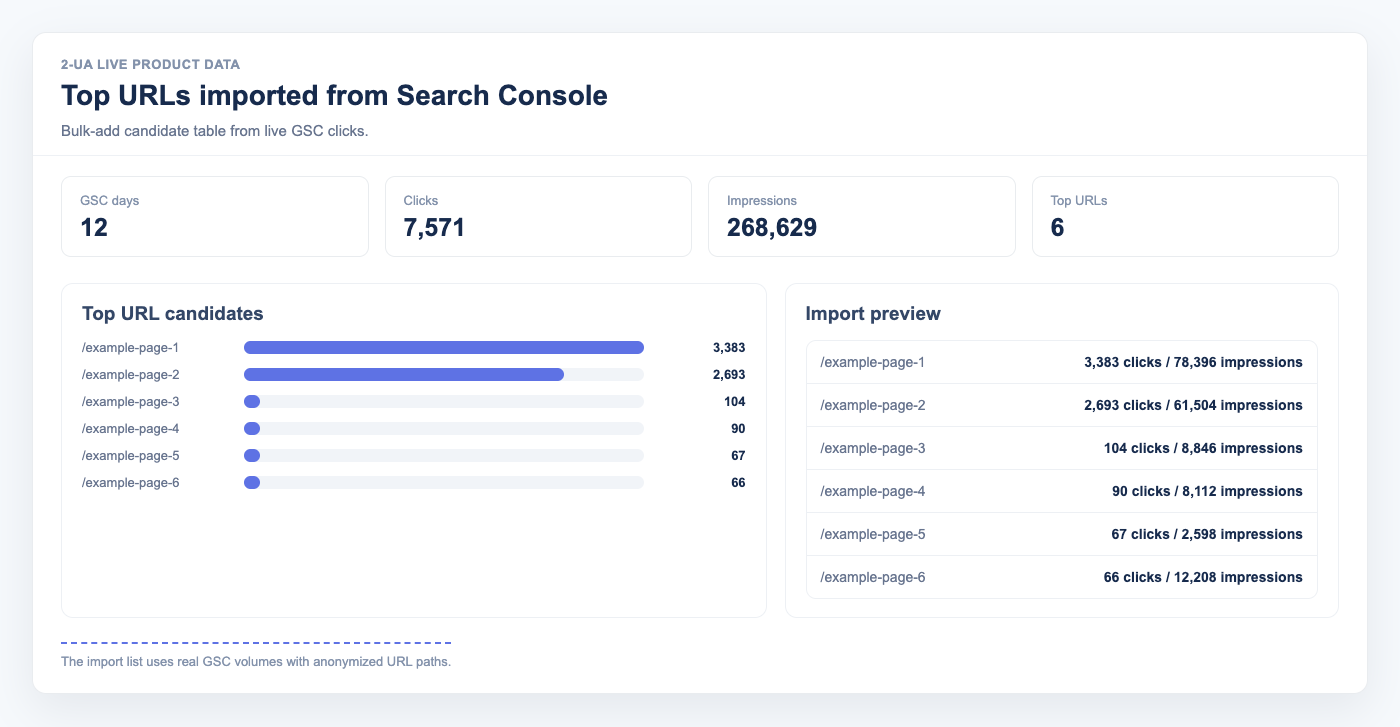
Adding tracked URLs one by one is one of the slowest parts of technical SEO onboarding. Most teams already know which pages matter most: Google Search Console has that answer in clicks and impressions. The new Import TOP 100 URL from GSC action in Bulk Add removes manual copy-paste and lets you start monitoring high-impact pages first.
What this feature does
On the Bulk Add page (/site/{id}/link/create_mass), click
Import TOP 100 URL from GSC.
2-UA reads your connected Google Search Console property, fetches top pages, and auto-fills the links textarea.
You can review the list, edit it, and save immediately.
- No CSV export from GSC
- No manual URL cleanup in spreadsheets
- No repetitive copy-paste into tracked URL forms
Why this matters for SEO operations
If you monitor the wrong pages, alerts and reports are less valuable. Importing top-performing pages from GSC ensures your first tracked set reflects real search demand. That improves triage quality, helps prioritize issues by traffic impact, and makes change monitoring immediately actionable.
How URL selection works
The importer requests Search Analytics data from your connected property for a recent period and limits output to 100 pages. Then it filters and normalizes URLs for Bulk Add input:
- Only pages that match the current site host are included
- URL paths are converted to tracked format (for example:
/category/page) - Query parameters are preserved when present
- Duplicate entries are removed before prefill
Step-by-step setup
- Connect Google Search Console for the site (Owner or Full User access).
- Open Tracked URLs → Bulk add URLs.
- Click Import TOP 100 URL from GSC.
- Review the prefilled list in the textarea.
- Remove utility or low-priority URLs if needed.
- Click Save to add them as tracked URLs.
Best practices after import
- Keep templates balanced: include homepage, category, product, blog, and conversion pages.
- Tag imported URLs by section or business area for cleaner reporting.
- Set expected status code and redirect behavior for critical URLs.
- Use Search Console timelines to correlate content changes with click and CTR movement.
Common pitfalls and how to avoid them
- GSC not connected: import will fail. Connect Search Console first from your site settings.
- Wrong property type: mismatched URL-prefix/domain properties can reduce matching quality. Ensure the connected property covers the monitored host.
- Empty import: can happen when a site has little recent search data or URL host mismatch. Validate site URL and property scope.
- Over-tracking low-value pages: after import, prune utility URLs to keep monitoring focused on traffic and revenue templates.
FAQ: import top 100 URLs from GSC
Does import create tracked URLs automatically?
No. Import only pre-fills the textarea. You still control the final list and must click Save to create tracked URLs.
Can I edit the imported list before saving?
Yes. You can remove, reorder, or append URLs in the textarea before saving.
Why do I see path-based URLs instead of full absolute URLs?
Bulk Add for tracked URLs is path-oriented for the current site project. The importer converts full GSC page URLs into the format expected by tracking.
Will it import URLs from other domains in the same GSC account?
No. The importer keeps only URLs matching the current project host to avoid cross-domain pollution in tracked lists.
How often should I run this import?
Run it during initial setup, after major site restructures, and periodically (for example monthly) to refresh monitored coverage based on current search demand.
Is this a replacement for full-site crawling?
No. GSC import gives high-impact monitored URLs quickly. Full crawling is still needed for broad discovery and hidden technical issues.
For deeper context on Search Console data flow and click/CTR tracking, read Google Search Console integration for SEO monitoring.