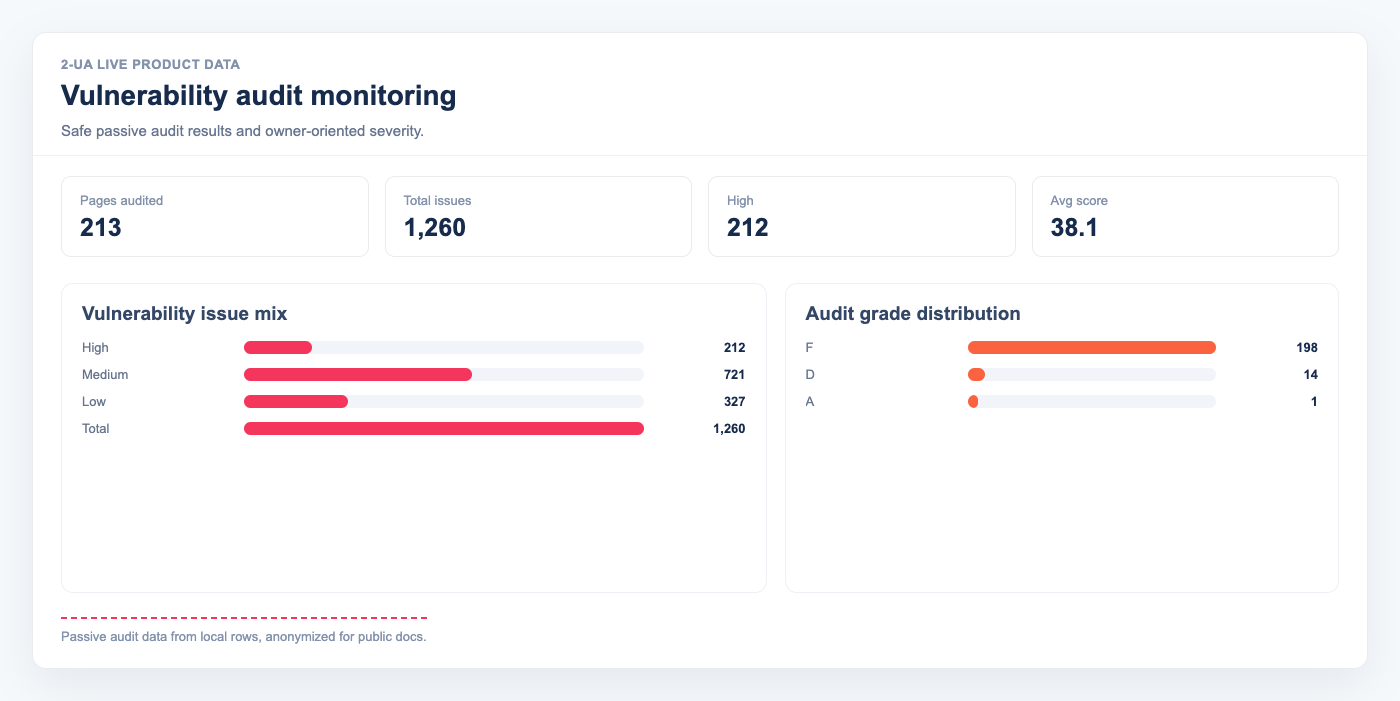
Vulnerability audit monitoring performs safe passive security checks on tracked URLs and stores a remediation-ready report. It detects exposed files, outdated software fingerprints, misconfigurations, and XSS warning patterns.
How to enable and schedule vulnerability audit for a site
- Open website settings: /site/view/{site_id}.
- Enable weekly vulnerability audit.
- Set Vulnerability audit run time in
HH:MMformat. - Save settings.
The scheduler checks run windows frequently, but each site is guarded by a weekly rule: one automatic vulnerability run at most every 7 days.
How to open vulnerability audit reports
- Open your project and go to Tracked URLs.
- Click Quick menu next to a URL.
- Select Vulnerability audit for per-URL details.
- Use the project-level Vulnerability audit page for site-wide summary.
What the report includes
- Score and grade (A–F)
- Severity counts (high / medium / low)
- Dangerous file findings (for example
/.env, backup files, logs) - Outdated software findings based on visible version fingerprints
- Misconfiguration findings (headers, methods, HTTPS policy, directory listing)
- XSS risk findings (reflected/DOM warning patterns and CSP hardening signals)
- Owner mapping with suggested actions for each team
How to use findings safely
- Prioritize all high-severity findings first.
- Assign each item by the Owner column (DevOps, Backend, Frontend, CMS owner).
- Apply the provided Fix guide and verify with Re-check now.
- Keep weekly schedule enabled to catch regressions after deployments.
Note: Vulnerability audit in 2-UA is defensive and non-destructive.
It does not run exploit payloads and does not perform password brute-force attacks.
Still need help?
Ask us about this workflow
Send the page or report you are working with and describe where you are stuck.