alt attribute, every page has an H1, and every link has text.
The release is called “accessible.” A keyboard user still cannot close the menu, a screen-reader user hears the product filters in the wrong state, and the checkout
error summary never receives focus. The crawler was not wrong. The decision made from its evidence was.
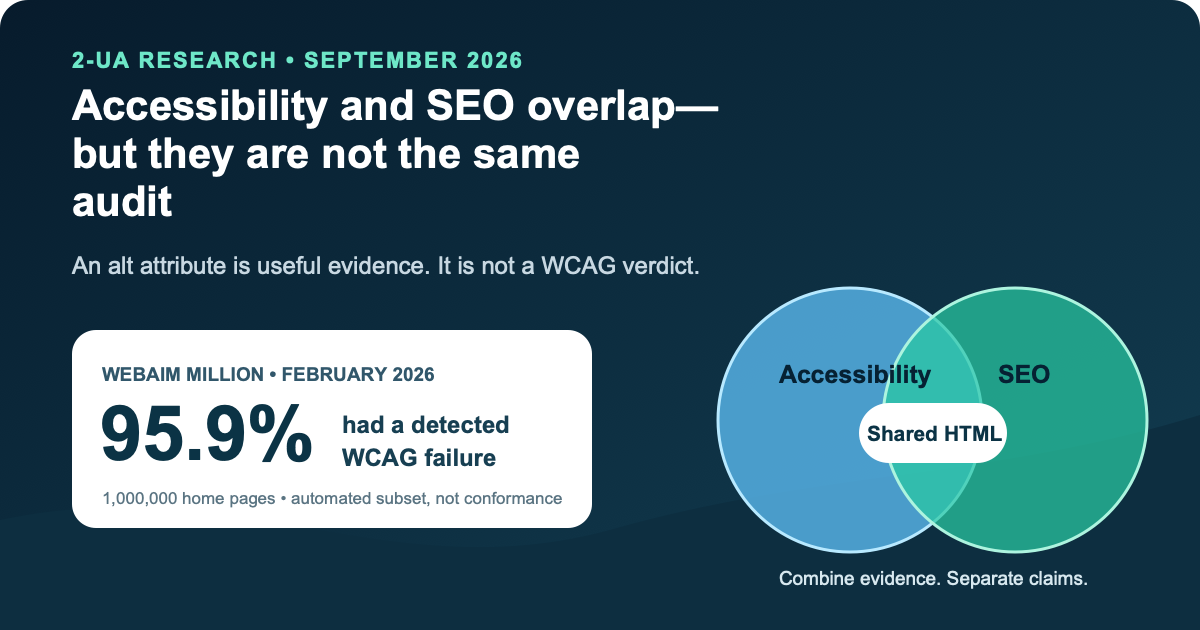
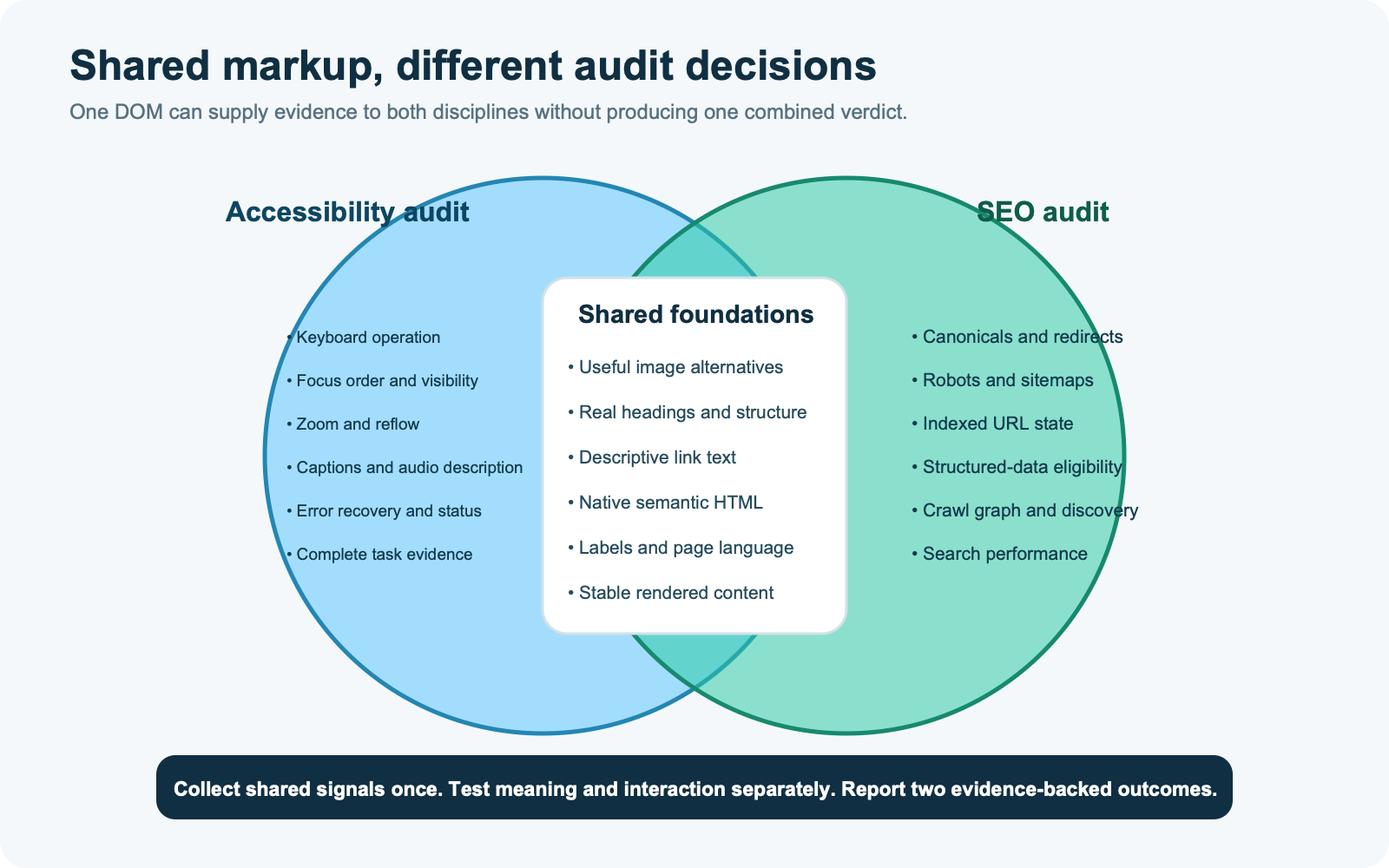
Accessibility and search optimization do overlap. Both benefit when content has useful text alternatives, descriptive links, real headings, semantic HTML, and a stable rendered DOM. Google says it uses alternative text with page context and computer vision to understand an image, and it uses a linked image’s alternative text as anchor text.7, 8 WCAG also requires text alternatives that serve an equivalent purpose and programmatically determinable structure.1
But shared inputs do not make the audits interchangeable. An SEO audit asks whether a search system can discover, interpret, consolidate, and present a resource. An accessibility audit asks whether people with different disabilities can perceive, understand, navigate, and operate the experience—and whether the evaluated scope meets a stated conformance target. One can pass while the other fails.
The answer in one minute
- Reuse collection, not verdicts. Crawl the rendered DOM once if that is efficient, but route each finding to the standard and owner that can decide it.
- Treat shared signals as foundations. Image alternatives, headings, link text, language, labels, and native semantics can support both disciplines.
- Keep search-only evidence separate. Canonicals, robots directives, sitemaps, redirects, structured-data eligibility, and indexed state are not WCAG conformance tests.
- Keep accessibility-only evidence visible. Keyboard operation, focus order and visibility, reflow, zoom, captions, error recovery, announcements, and complete tasks are not settled by an SEO crawl.
- Never convert “no automated findings” into “accessible.” WCAG 2.2 is designed for automated testing plus human evaluation, and conformance applies to full pages and complete processes.1
- Use a release ladder. Machine checks block known regressions; guided human review tests meaning and interaction; assistive-technology and user evidence test whether important journeys actually work.
Two audits, two decisions
The fastest way to avoid category errors is to write the decision before choosing the tool. “Can Google find and understand this product page?” is different from “Can a person using a keyboard and screen reader configure and buy this product?” The first decision may need crawlability, rendering, canonicalization, internal links, structured data, and Search Console evidence. The second needs a declared WCAG target, full-page review, interaction testing, and coverage of the complete purchasing process.
| Question | SEO audit | Accessibility audit |
|---|---|---|
| Primary outcome | Discovery, interpretation, indexing eligibility, consolidation, and search presentation | Perceivable, operable, understandable, and robust content against a stated target |
| Primary actors | Crawlers, rendering systems, indexing systems, search interfaces, and search users | People with disabilities, browsers, input methods, assistive technologies, content and interface authors |
| Typical scope | URLs, templates, crawl graph, rendered content, directives, and search-platform observations | Full pages or views, responsive variants, representative samples, dynamic states, and complete processes |
| A passing automated result means | The implemented rules found no failure in the material they inspected | The implemented rules found no machine-decidable failure; manual and task evidence are still required |
| Evidence outside a crawler | Search Console, URL inspection, logs, analytics, and sometimes experiments | Keyboard review, zoom/reflow, screen-reader checks, captions, cognitive review, error recovery, and user testing |
WCAG makes this difference concrete. Level AA is not an average score: every applicable Level A and AA success criterion must be satisfied. Conformance is for a full page, including responsive variations, and every page in a complete process must conform for that process to conform.1 That model does not resemble a crawler dashboard where 98 out of 100 checks can be summarized as “98% accessible.” A percentage may describe tests passed. It cannot silently become a conformance level.
Where the evidence genuinely overlaps
The overlap is valuable precisely because it is narrower than “good accessibility equals good SEO.” Several implementation choices create machine-readable meaning that both assistive technology and search systems can use. Fixing them once can remove two kinds of failure, even though each discipline evaluates the result differently.
Images and text alternatives
WCAG 2.2 Success Criterion 1.1.1 requires non-text content to have a text alternative that serves the equivalent purpose, subject to defined exceptions. WHATWG’s HTML guidance makes the context dependency explicit: the replacement should preserve meaning, should not merely repeat a caption, and may be empty for decoration or information already fully present in adjacent prose.1, 4
Google’s image guidance asks for useful, information-rich alt text in context and warns against keyword stuffing. This is a genuine shared signal, but the success test differs. Search asks whether the text helps describe image subject matter or a linked destination. Accessibility asks whether the alternative preserves the image’s purpose for someone who cannot perceive it. A product photograph, a chart, a decorative flourish, and an image-only buy button therefore need different decisions even when the markup shape looks similar.
Headings and document structure
Real headings help expose structure. WCAG requires information and relationships conveyed through presentation to be programmatically determinable, and Level AA requires headings and labels to describe topic or purpose.1 Google can also use headings and prominent page text when understanding and presenting a page. Yet an SEO check that finds one H1 cannot establish that visual headings are marked as headings, that the hierarchy reflects the content, or that a screen-reader user can efficiently navigate the page.
Links and purpose
Google recommends crawlable <a href> links with descriptive, concise, relevant anchor text. WCAG asks whether a link’s purpose can be determined
from its text or programmatically determined context.1, 8 “Read our returns policy” is usually better than
“click here” for both. But search crawlability says nothing about whether focus reaches the link in a sensible order, whether focus is visible, whether a sticky
header hides it, or whether a custom control activates from a keyboard.
Native semantics and rendered content
Semantic HTML creates durable structure for parsers. A native button exposes expected meaning and behavior more reliably than a clickable div with a
role. Google advises developers to use semantic HTML and keep important text in the DOM.7 WAI-ARIA can expose semantics for custom
widgets, but the ARIA Authoring Practices Guide warns that adding role="button" does not make the browser supply keyboard behavior or styling; the role
is a promise the author must fulfill.5, 6
The overlap does not create a ranking claim
It is reasonable to infer that clearer markup can reduce ambiguity for multiple consumers. It is not reasonable to jump from that inference to “WCAG conformance is a ranking factor” or “fixing accessibility will increase organic traffic.” None of the pivotal sources here publishes such a causal effect. Use the overlap to coordinate engineering work, not to invent a search forecast.
Six false equivalences to remove from the report
Shared terminology makes weak conclusions sound plausible. Remove these equivalences from requirements, tickets, dashboards, and client reports before they become release criteria.
-
“The attribute exists” is not “the alternative works.” A scanner can determine that
alt="blue-shoe-final-v4.jpg"exists. It cannot accept that string as a meaningful replacement just because the field is non-empty. Conversely,alt=""can be the correct result for a decorative or redundant image. The decision depends on purpose, surrounding content, and whether the image is also a control or link. - “Google can crawl it” is not “a user can operate it.” A URL may be discoverable through another link or sitemap while the visible custom control remains unreachable from a keyboard. Search discovery can succeed even when the interface that presents the destination creates a barrier.
- “The name is exposed” is not “the component behaves correctly.” An ARIA role and label can produce a plausible accessibility-tree node while focus management, keyboard interactions, expanded state, selection, and error behavior remain broken. A role describes semantics; it does not supply the implementation promised by those semantics.
- “The heading outline exists” is not “the content is understandable.” Correct elements can still carry vague labels, split a thought at the wrong level, or appear in a reading order that differs from the visual one. Search and accessibility tools can inventory headings; topic, purpose, sequence, and cognitive clarity still need review.
- “The page passed” is not “the process passed.” A product page can be technically clean while the address dialog traps focus, the payment iframe has no usable name, or the confirmation is announced only by color. WCAG’s complete-process rule prevents a team from excluding the inconvenient step that actually blocks the outcome.
- “The score improved” is not “the risk fell.” Fixing forty duplicate low-severity findings can move a percentage while one keyboard trap still blocks checkout. Prioritize by affected task, frequency, user impact, scope, and confidence—not by whichever change makes a dashboard look green fastest.
These distinctions also improve engineering economics. They keep teams from rewriting good empty alternatives into noisy text, adding ARIA where native HTML would be safer, or closing a critical interaction defect because a crawler’s aggregate score rose. The goal is not two parallel bureaucracies. It is one traceable evidence system that refuses to let a cheap observation answer an expensive question.
What automation can and cannot decide
The 2026 WebAIM Million report demonstrates both the power and the boundary of automation. Using WAVE against the rendered DOM of one million home pages from a Tranco-derived list, WebAIM detected 56,114,377 errors—56.1 per page—and found at least one detected WCAG failure on 95.9% of pages.9 The six most common page-level failures were low contrast (83.9%), missing image alternative text (53.1%), missing form labels (51.0%), empty links (46.3%), empty buttons (30.6%), and missing document language (13.5%). Categories overlap, so those percentages must not be added.
Those results are operationally useful. Repeated, deterministic failures can be found across thousands of pages, assigned to a component owner, blocked in CI, and monitored after release. The same report also states the critical limitation: not all conformance failures can be detected automatically, and the absence of detected errors does not show that a page is accessible or conformant. That is not a disclaimer to hide in a footer. It determines how the result may be used.
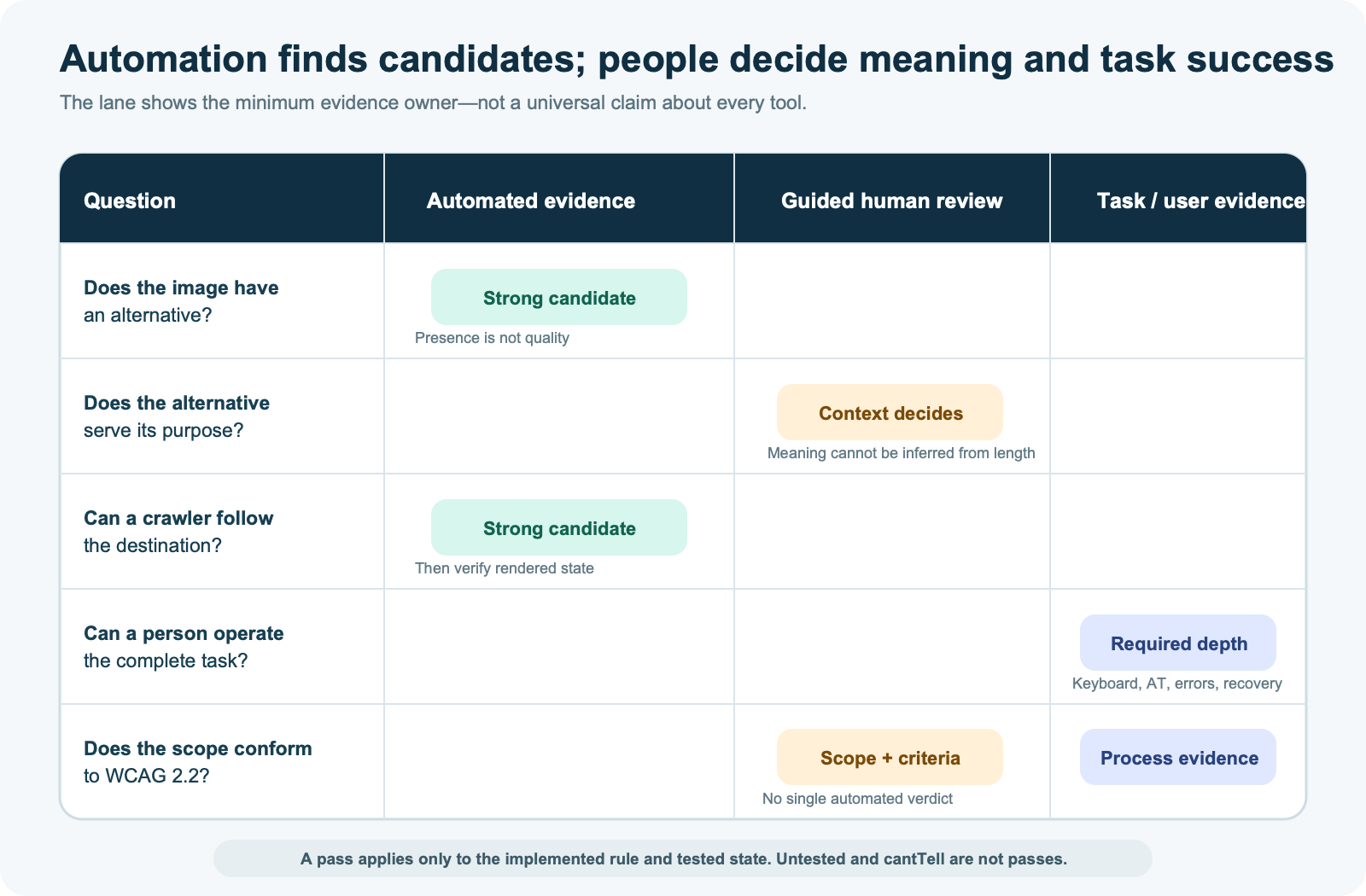
ACT Rules Format 1.1 gives teams a better mental model than a single score. A rule can pass, fail, be inapplicable, remain untested, or return cantTell
when the tester cannot fully determine applicability or expectations.3 Preserve those states. Converting “not tested” into “passed”
is how dashboards manufacture confidence.
| Evidence type | Good automation candidates | Needs human or task evidence |
|---|---|---|
| Images | Missing alt, empty linked image, duplicate/generic patterns |
Whether the alternative serves the image’s purpose in context |
| Structure | Heading elements, missing language, label associations, duplicate IDs, invalid ARIA values | Whether headings reflect real sections and reading order preserves meaning |
| Interaction | Some focusability, role/state relationships, static contrast, target attributes | Keyboard completion, focus movement, visible state, announcements, error recovery |
| Search | Status, crawlable links, canonical, robots, metadata, rendered differences | Search intent, snippet usefulness, selected canonical, business effect |
| Conformance | Evidence for individual implemented rules | Scope, applicable criteria, full pages, responsive variants, complete processes, support baseline |
Alt text: the smallest useful worked example
Imagine a category page with the same shoe photograph in four contexts. A scanner sees four img elements. A useful audit asks four different questions.
- Product card: the image is the only content inside a link. Its alternative should communicate the link’s purpose, usually the product name or meaningful destination—not “shoe photo.” This supports both link purpose and search anchor context.
- Product card with adjacent linked name: the same destination and name are already available next to the image. Repeating the entire product name can create redundant announcements. Depending on the link structure, empty alternative text may be appropriate.
- Color-selection control: the image changes the selected variant. The accessible name and selected state must expose the control’s purpose and current value. A descriptive filename in
altdoes not implement the interaction. - Editorial detail photo: the image shows a waterproof seam that the prose discusses. The alternative should preserve the relevant information, not stuff product keywords or duplicate the caption.
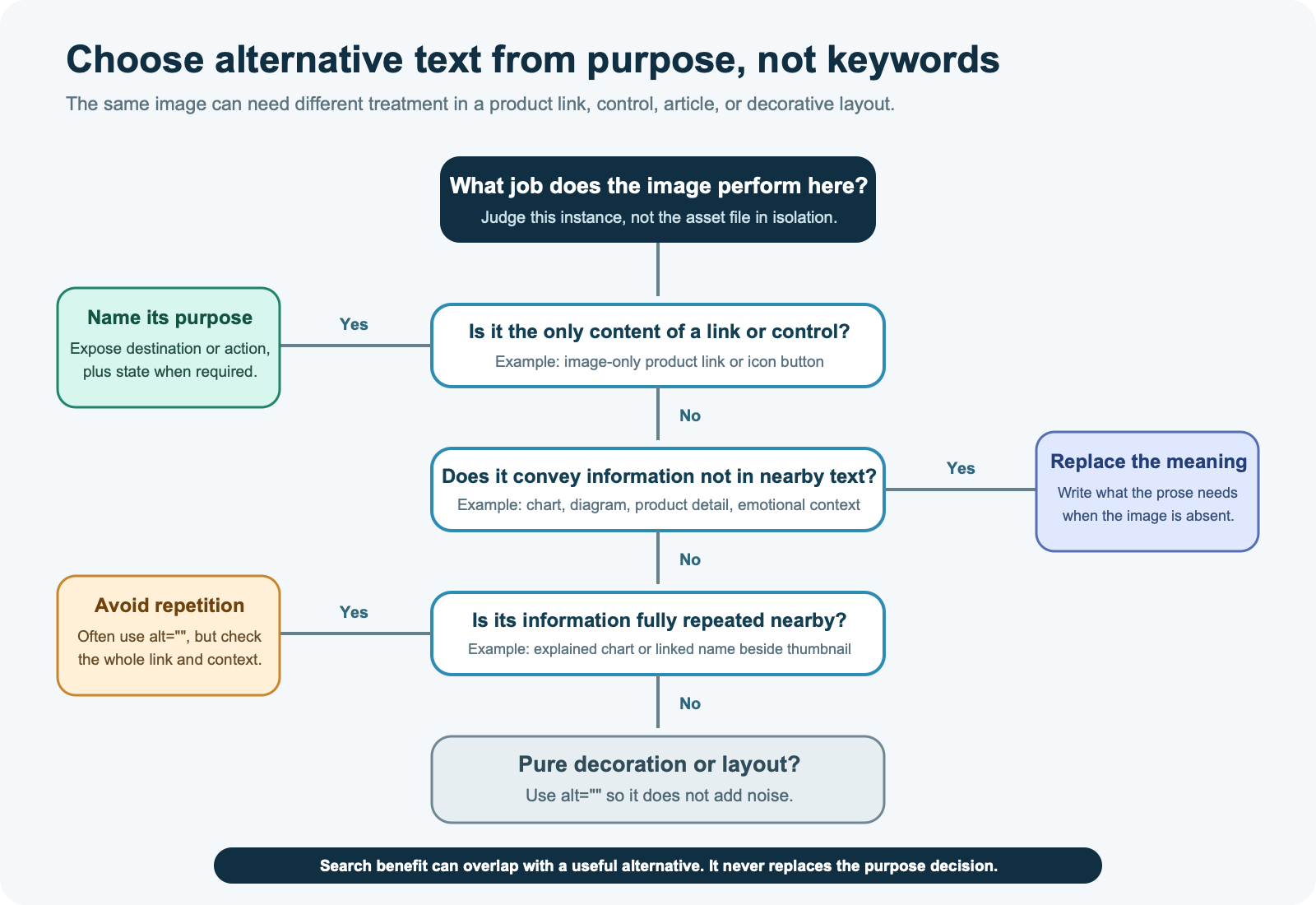
The worked example exposes the central flaw in attribute counting. Presence is a syntactic fact. Adequacy is a contextual decision. WebAIM found that 16.2% of
66.6 million sampled images lacked alternative text, excluding alt="". It also found questionable or repetitive text on 10.8% of images that did have
alternative text.9 The second number matters: filling the attribute can improve a completeness metric while preserving a barrier.
A three-ledger audit framework
Keep one collection pipeline if it saves time, but maintain three ledgers. This prevents a shared DOM observation from acquiring the wrong verdict.
Ledger 1: shared technical foundations
Record the URL, rendered state, device profile, component/template, evidence layer, rule version, and exact DOM evidence. Put alternative-text presence, linked-image purpose candidates, heading markup, descriptive link text, page language, labels, native elements, ARIA validity, and source/rendered divergence here. Each row must retain two dispositions: search impact and accessibility impact. “Not applicable,” “unknown,” and “needs review” are valid outcomes.
Ledger 2: search evidence
Record status codes, redirect chains, robots controls, canonical signals, crawlable internal links, structured data, sitemap membership, search-engine inspection, and observed search performance. Do not copy an accessibility severity into this ledger unless the same implementation creates a defensible search failure. A keyboard trap can be critical to users and still lack a known indexing effect.
Ledger 3: accessibility evidence
Record the conformance target, viewport and responsive variant, browser and assistive-technology combination, input method, task, expected behavior, observed behavior, relevant WCAG success criterion, and reviewer judgment. Include full pages and complete processes. WCAG-EM 2.0 recommends exploring common views, essential functionality, content types, dynamic states, technologies, authoring variation, high-risk functions, structured samples, random samples, and complete processes.2
One issue can create several tickets
Suppose a catalog card is a clickable div, contains an image with filename-based alternative text, and navigates only from a pointer click. The shared
ledger holds the markup and rendered evidence. The search ticket replaces the non-crawlable navigation with a real link and gives the destination meaningful
anchor context. The accessibility ticket restores native link behavior, keyboard operation, visible focus, and a useful accessible name. One code change may fix
both, but the acceptance criteria stay explicit.
A one-page audit sequence
Use the following sequence before expanding site-wide. It is deliberately ordered from deterministic collection to consequential task evidence.
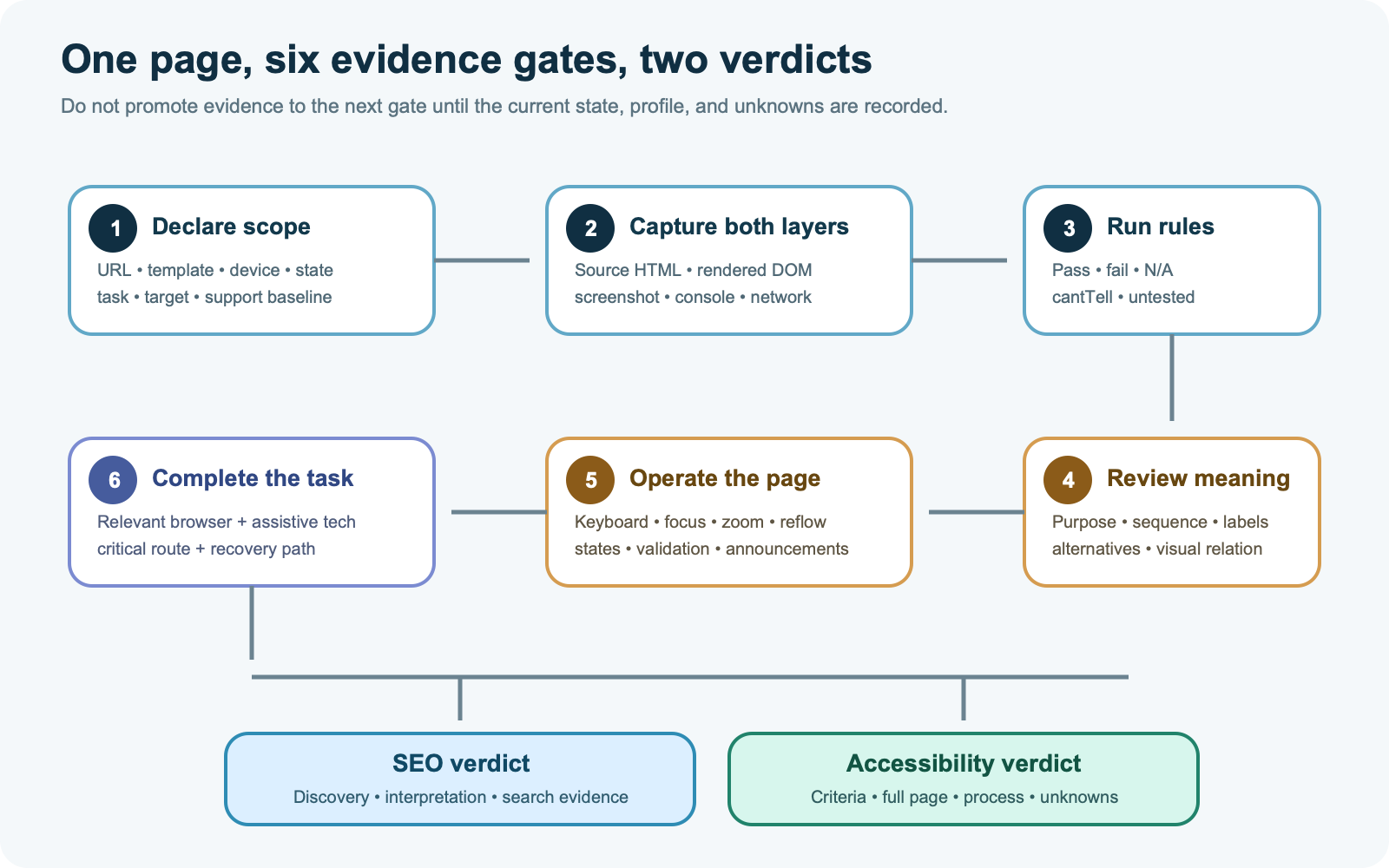
- Declare scope and profiles. Name the URL, template, viewport, responsive state, authentication state, language, conformance target, and task. A desktop marketing page is not evidence for a mobile checkout dialog.
- Capture source and rendered evidence. Record status, final URL, DOM, screenshot, console errors, resources, metadata, headings, links, images, form controls, language, and ARIA. Label anything unavailable as unknown.
- Run deterministic rules. Use versioned SEO and accessibility rules. Preserve pass, fail, inapplicable,
cantTell, and untested rather than forcing a score. - Review meaning. Check whether headings describe sections, link text communicates destination, alternatives preserve purpose, labels match controls, and visual order matches the programmatic reading order.
- Operate the page. Use the keyboard; inspect focus order and visibility; zoom and reflow; trigger menus, dialogs, validation, loading states, and errors; then test the critical task with relevant assistive technology.
- Issue separate verdicts. Write what is known for search, what is known for accessibility, what remains untested, who owns each finding, and what evidence closes it.
2-UA’s website accessibility checker can contribute to steps two and three by comparing source and rendered evidence, reporting selected automated rules with WCAG references, and retaining a manual-review backlog for desktop or mobile. It does not perform a full WCAG conformance evaluation, certify legal compliance, or replace keyboard, assistive-technology, and user testing. Those boundaries are part of the product result, not optional fine print.
What to do this week and observe for 30 days
This week: establish the release contract
- Select one high-value complete process, such as product discovery through purchase, lead form submission, or account registration.
- Choose representative desktop and mobile views, including menus, filters, dialogs, validation, empty states, and success states.
- Declare the accessibility target and support baseline. For most teams this means documenting WCAG 2.2 Level AA as the evaluation target and naming the browser, input, and assistive-technology combinations to test—not claiming conformance before evaluation.
- Run source and rendered technical checks; cluster repeated findings by component rather than opening one ticket per URL.
- Perform a keyboard pass and a guided meaning review on every selected view. Complete the process with at least one relevant screen-reader/browser combination.
- Assign every finding an owner, evidence state, severity rationale, regression test where feasible, and closure evidence.
Days 1–30: measure three different things
| Measure | What to watch | Change-course trigger |
|---|---|---|
| Technical regression | New deterministic failures by rule, template, device, release, and source/rendered layer | Pause rollout when a critical shared component introduces a repeatable failure or an evidence layer becomes unavailable |
| Task completion | Keyboard and assistive-technology completion, blocked steps, error recovery, focus/announcement defects | Rollback or hotfix when an essential task cannot be completed or a critical state is not perceivable |
| Search behavior | Crawl status, rendered parity, indexed state, selected canonical, image discovery, and query/page trends | Investigate when the intended resource becomes undiscoverable, misinterpreted, excluded, or materially loses qualified search performance |
Do not demand that accessibility fixes produce an SEO lift in 30 days. That is the wrong acceptance criterion. The first success condition is that known barriers are removed and stay removed across the tested process. Search measurements are a separate observation: they can reveal unintended crawl or presentation effects, but absence of a traffic increase does not invalidate an accessibility fix.
Thirty-day review
At day 30, change course if critical task failures remain, if the same component repeatedly regresses, if “unknown” evidence is being counted as pass, or if the sample omits a major template, state, language, or process branch. Expand the program when critical tasks are repeatably completable, deterministic regressions stay controlled, human-review debt is declining, and the same evidence can be reproduced by another reviewer. Keep the SEO and accessibility outcome columns separate even when one component fix improves both.
The strongest counterposition
The strongest reasonable objection is operational: maintaining two audits sounds wasteful because both tools inspect the same rendered DOM. A mature crawler can collect images, headings, labels, links, language, roles, states, contrast candidates, and source/rendered differences in one run. Why not call that a combined accessibility-and-SEO audit?
The collection argument is correct. The verdict argument is not. WCAG is designed for automated testing and human evaluation, and its conformance model includes full pages, responsive variants, complete processes, applicability, and accessibility support.1 WCAG-EM adds scope exploration, representative sampling, dynamic states, technologies, high-risk functionality, and documented evaluation outcomes.2 Google’s documentation, by contrast, explains how its search systems discover and understand resources. The same DOM can efficiently feed both investigations without making their standards, populations, evidence, or pass conditions identical.
So the durable compromise is one evidence pipeline, multiple rule families, and separate verdicts. A dashboard may present them together if it never collapses unknowns into passes or an automated subset into certification.
Small-site, platform, and product boundaries
For a small site
Do not wait for an enterprise program. Evaluate every unique template if the set is small, plus the complete contact, signup, or purchase process. Start with native HTML, image purpose, link purpose, headings, labels, language, keyboard access, visible focus, zoom/reflow, and error recovery. A spreadsheet can hold the three ledgers. The important distinction is not tooling sophistication; it is whether someone actually operates the page and records what remains untested.
For a large platform
Component ownership and sampling become decisive. Evaluate design-system components in isolation, but also test them inside representative pages and complete processes. Include different templates, authors, technologies, languages, states, permissions, and responsive presentations. Use automated rules for breadth, structured and random samples for coverage, and high-value journeys for depth. Record tool and rule versions so a changed result can be separated from changed code.
For legal and procurement claims
This article is an engineering and evaluation framework, not legal advice. WCAG conformance is not automatically identical to compliance with every law, regulation, contract, or procurement standard. A public accessibility statement, legal assertion, or certification needs the correct jurisdictional and organizational process. Do not let an SEO report, Lighthouse score, WAVE result, or 2-UA report silently become that assertion.
For product boundaries
Technical crawling can find repeated image, heading, link, label, language, markup, and rendered-DOM issues across many URLs. It cannot observe every personalized state, judge every text alternative, verify caption accuracy, determine cognitive clarity, operate every branch, or represent the experience of people with disabilities. Evidence beyond 2-UA may require authenticated test environments, analytics, browser/assistive-technology labs, accessibility specialists, and user research. Search conclusions may additionally require Search Console, URL inspection, access logs, and business analytics.
What the evidence does not show
- The sources do not show that WCAG conformance is a Google ranking factor or that an accessibility fix will increase traffic.
- The WebAIM Million is a February 2026 automated analysis of one million selected home pages, not a census of all pages, authenticated applications, countries, disabilities, or complete user journeys.
- Its 95.9% result means at least one automatically detected WCAG failure; it is not the percentage of people blocked, the percentage of criteria failed, or a legal non-compliance rate.
- The association between ARIA use and more detected errors does not show that ARIA caused those errors; the report itself identifies page complexity as a confounder.
- No credible universal percentage describes how much of WCAG any automated tool can test across all technologies, states, and content.
- Passing a selected rule set shows only that those rules found no failure in the tested state. It does not convert untested or
cantTelloutcomes into pass. - WCAG itself notes that it does not address every need of every person with every type, degree, or combination of disability.1
Implementation checklist
Scope and evidence
- Write the SEO decision and accessibility decision separately.
- Name URLs, templates, tasks, responsive variants, states, languages, technologies, and support baseline.
- Capture source and rendered evidence with the same device profile when comparing runs.
- Record tool, ruleset, browser, assistive technology, viewport, date, and release.
- Preserve pass, fail, inapplicable, untested, and
cantTell.
Shared foundations
- Use native headings, links, buttons, labels, lists, tables, and landmarks before adding ARIA.
- Write image alternatives from purpose and context; allow
alt=""for genuine decoration or fully redundant imagery. - Give links and controls descriptive names; inspect linked images separately.
- Keep important content and semantics in the rendered DOM.
- Test source/rendered differences rather than assuming server HTML is the final experience.
Accessibility depth
- Operate every selected view with a keyboard and inspect focus order, visibility, and obscuration.
- Test zoom, text spacing, reflow, orientation, and responsive variations.
- Trigger validation, errors, loading, success, dialogs, menus, carousels, and live updates.
- Complete critical processes with relevant browser and assistive-technology combinations.
- Review captions, transcripts, sensory instructions, content clarity, and alternatives with human judgment.
Release and monitoring
- Block known deterministic regressions in shared components.
- Cluster repeated failures by component and template, not only by URL.
- Assign separate SEO and accessibility dispositions and closure evidence.
- Recheck critical tasks after releases and when design-system components change.
- Never label an automated score or clean crawl as WCAG certification.
The practical rule is simple: combine the plumbing, separate the claims. Shared technical checks are a strong first line of defense. Search evidence
still needs search-specific validation. Accessibility evidence still needs scope, human judgment, interaction, and complete-task testing. An alt
attribute can be useful to both disciplines; it is not an accessibility audit.
Primary sources and research
- W3C, Web Content Accessibility Guidelines (WCAG) 2.2, W3C Recommendation, 5 October 2023.
- W3C, WCAG Evaluation Methodology (WCAG-EM) 2.0, W3C Group Note, 23 July 2026.
- W3C, Accessibility Conformance Testing (ACT) Rules Format 1.1, W3C Recommendation, 5 February 2026.
- WHATWG, HTML Standard: requirements for providing text to act as an alternative for images, Living Standard.
- W3C, Accessible Rich Internet Applications (WAI-ARIA) 1.2, W3C Recommendation, 6 June 2023.
- W3C WAI, ARIA Authoring Practices Guide: Read me first, implementation guidance.
- Google Search Central, Google image SEO best practices, first-party platform documentation.
- Google Search Central, Link best practices for Google, first-party platform documentation.
- WebAIM, The WebAIM Million: the 2026 report on the accessibility of the top 1,000,000 home pages, February 2026 observational analysis.
- W3C WAI, Easy Checks – A First Review of Web Accessibility, preliminary evaluation guidance.