Monitoring Commercial MOFU

Monitor SEO page changes locally in Chrome

Save a local baseline and get Chrome alerts when a public page changes its status, robots directives, canonical, metadata, schema, content, or links.

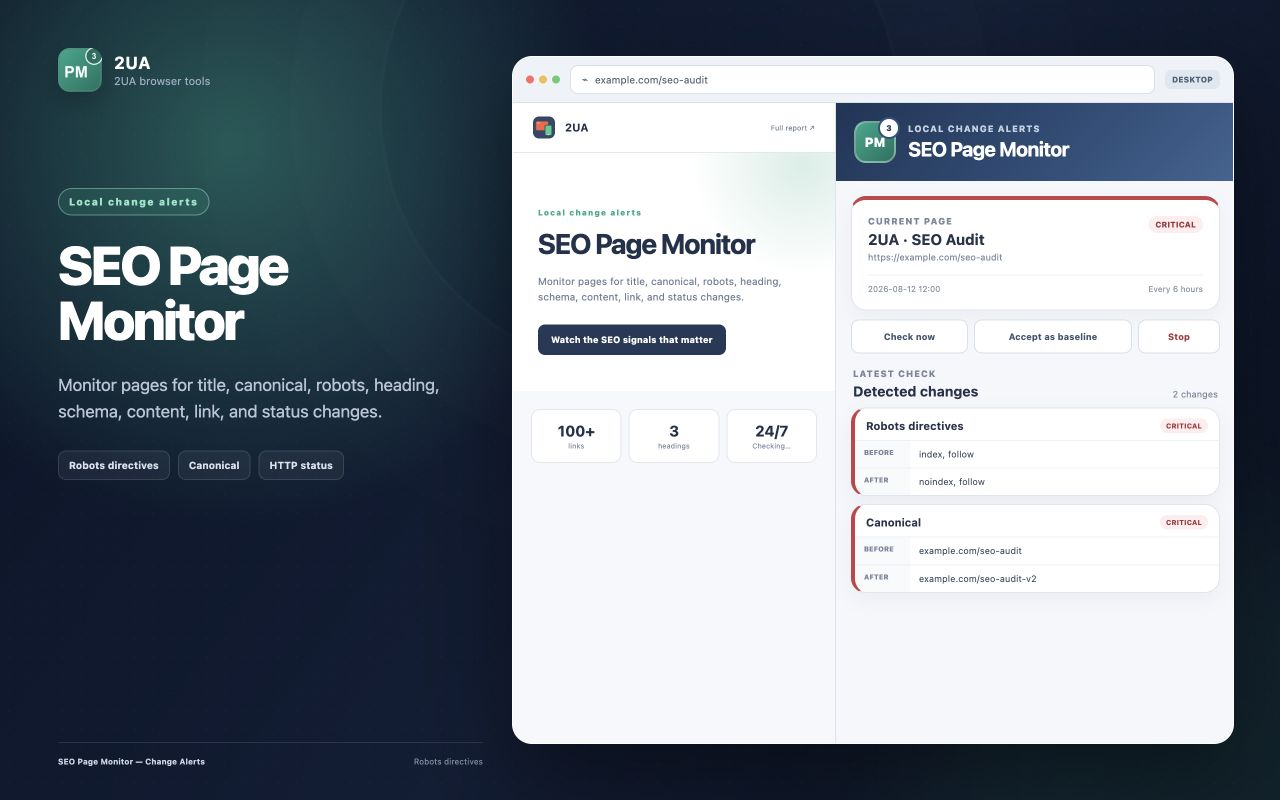
SEO page monitor chrome extension showing detected robots and canonical changes on a monitored page
SEO page monitor compares the latest public HTML with a local baseline and shows the exact SEO signals that changed.

Important page-level SEO regressions often happen between scheduled audits. SEO page monitor saves a compact baseline in Chrome, checks the public page again while the browser is running, and sends a notification when a monitored signal changes. It is a focused local monitor for critical landing pages, products, articles, and production templates.

What the extension monitors

  • HTTP status, meta robots, and X-Robots-Tag.
  • Canonical URL, title, meta description, and H1.
  • Added or removed JSON-LD schema types.
  • Visible-content changes with the exact added and removed text blocks.
  • Internal-link changes with the exact added and removed URLs.

How local page monitoring works

  1. Open a public HTTP or HTTPS page and launch SEO page monitor.
  2. Choose an hourly, 6-hour, or 24-hour check frequency.
  3. Start monitoring; Chrome requests runtime access only to that website.
  4. The extension saves a compact local SEO baseline and checks the public HTML without cookies.
  5. When a tracked signal changes, Chrome creates a notification and the side panel shows the before-and-after evidence.

You can monitor up to 10 pages per website. The extension groups monitored pages by website and keeps the latest five detected changes for each page. Checks with no differences do not add noise to the change history.
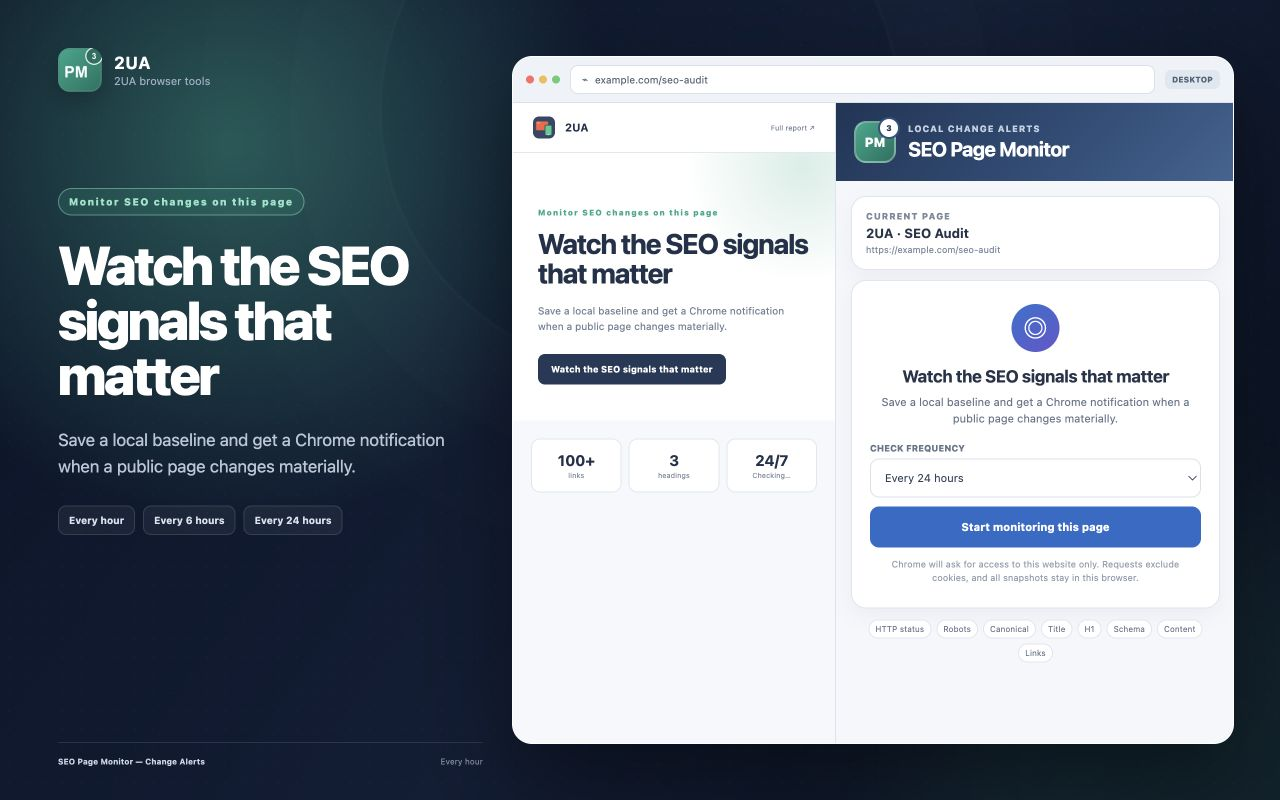
SEO page monitor setup screen with hourly, six-hour, and daily check frequency options
Choose the frequency, accept the current public page as the baseline, and let Chrome check it while the browser is running.

What a useful change alert contains

A notification is only the entry point. The side panel records the affected field and its previous and current values, so the team can decide whether the change was intentional. Content and link alerts include the exact blocks or URLs added and removed instead of reporting only that “the page changed.”

Detected changeWhy it deserves review
200 becomes an error or redirectThe monitored landing page may no longer serve its intended content.
noindex appearsAn indexable page can be removed from search results.
Canonical target changesSignals may consolidate to the wrong URL or environment.
Title, description, or H1 changesA CMS or template update may replace carefully reviewed metadata.
Schema type disappearsThe page may lose machine-readable entity or rich-result data.
Content or internal links are removedImportant answers and crawl paths may have disappeared.

Local monitoring has a clear boundary

Chrome alarms do not wake a sleeping computer and may run later than the selected interval. Missed checks resume when the browser and device become active. The extension is therefore useful as a free safety net for a small set of public pages, but it is not a substitute for server-side monitoring when checks must run continuously, across many URLs, with team alerts and reporting.

For broader coverage, use a site crawl to find priority URLs, then move business-critical pages into recurring 2-UA monitoring with shared history and Slack or Telegram delivery.

Privacy and website access

The monitor fetches only public pages that you explicitly add. Requests exclude cookies and authentication credentials. Compact snapshots, frequency settings, timestamps, and the latest five detected changes stay in Chrome local extension storage. URLs, HTML, snapshots, history, and notification data are not sent to 2-UA or a third party.
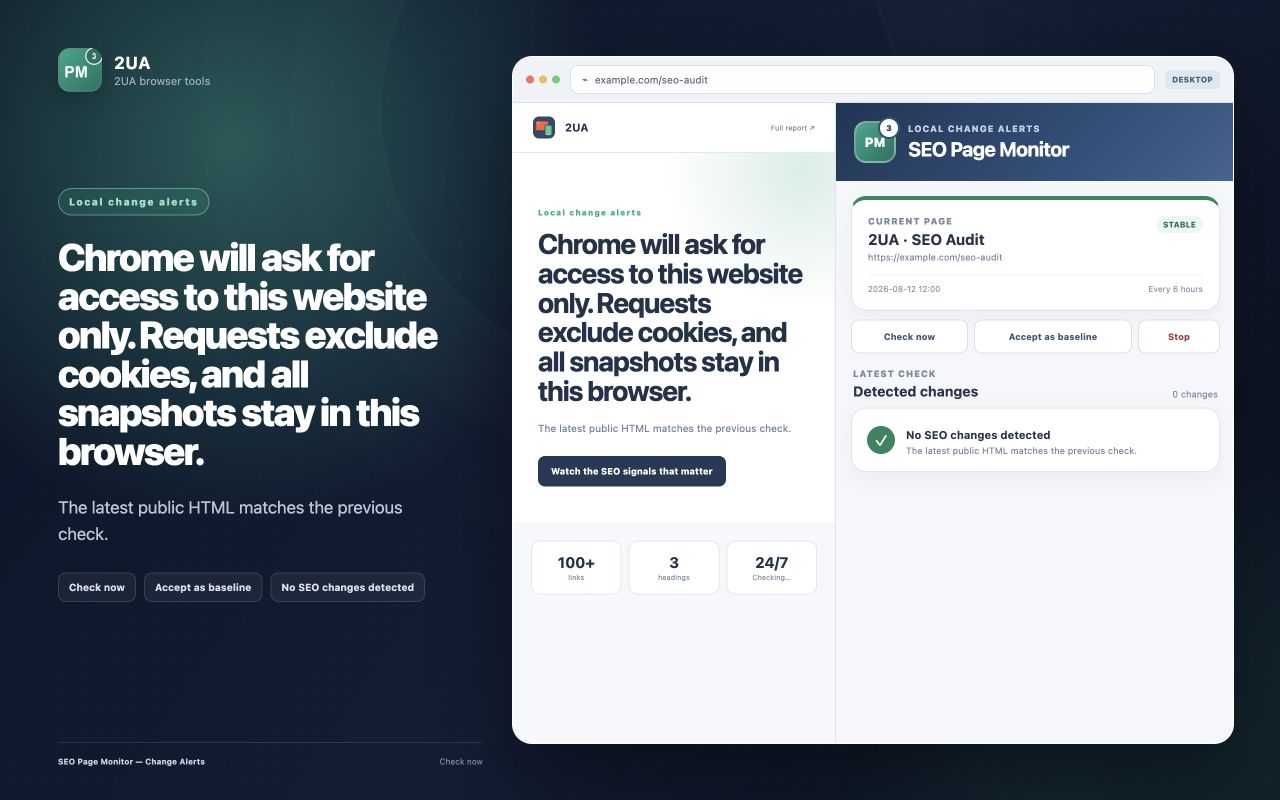
SEO page monitor showing a stable page and explaining that website access is limited and snapshots stay in the browser
Website access is requested when monitoring starts, and stopping the last page monitor removes that website permission.

Start monitoring a critical page

Install SEO page monitor, save a local baseline, and receive Chrome notifications when an SEO signal changes.

Install SEO page monitor

Execution blueprint for SEO page monitor chrome extension

Long-form SEO implementation fails when teams try to “fix everything” at once. The sustainable approach is to define a narrow execution lane, prove measurable movement, and scale based on validated impact. For monitoring workflows, this usually means setting explicit ownership, reporting cadence, and escalation thresholds.

A useful way to operationalize this is to split work into three layers: detection, validation, and rollout. Detection finds anomalies quickly. Validation confirms whether the anomaly is material or incidental. Rollout converts validated findings into engineering and content tasks with deadlines. If one layer is missing, the process becomes either noisy or slow.

90-day rollout plan

Days 1-14: baseline and instrumentation

  • Define the monitored scope: templates, critical URLs, and ownership groups.
  • Set expected behavior for status codes, redirects, and indexation-relevant rules.
  • Enable alerts in your team channel and set an initial noise-control policy.
  • Run the first full crawl and preserve it as a technical baseline snapshot.
  • Document the current known issues so future alerts can be triaged faster.

Days 15-45: controlled improvement

  • Move from URL-level fixes to issue-family fixes (template/system level).
  • Review trends weekly for response time, quality checks, and crawl findings.
  • Introduce tag-based segmentation if your team supports multiple page clusters.
  • Track fix validation in re-crawls and keep a short evidence log for each change.
  • Escalate only high-impact regressions to engineering to avoid context switching overload.

Days 46-90: scale and commercialization

  • Standardize recurring reports for stakeholders and client-facing communication.
  • Harden your alert policy with quieter thresholds and clear severity levels.
  • Expand monitoring from critical templates to full coverage where justified.
  • Turn recurring findings into preventive engineering tasks, not one-off tickets.
  • Connect technical trend movement to revenue-adjacent metrics for executive buy-in.

Measurement model: what to track weekly

You should define a compact KPI stack that reflects both technical quality and operational speed. Over-measuring creates reporting overhead and weakens decision quality. A practical KPI model for this topic includes:

  • Detection speed: time from change occurrence to first alert.
  • Triage speed: time from alert to issue classification and owner assignment.
  • Resolution speed: time from assignment to verified fix.
  • Regression rate: how often a fixed issue class returns within 30 days.
  • Coverage quality: share of critical pages included in active monitoring.
  • Business relevance: proportion of high-impact issues in total issue volume.

For mature teams, the strongest KPI is not total issue count but high-impact issue recurrence. When recurrence falls, process quality is improving.

Stakeholder alignment framework

Technical SEO execution usually fails at the handoff boundary. SEO specialists detect issues, but engineering sees isolated tasks without business context. Fix this by sending implementation-ready summaries:

  • What changed (objective signal, not interpretation).
  • Where it changed (template, segment, or specific URL class).
  • Why it matters (indexation, visibility, trust, conversion risk).
  • What to do next (single recommended action with acceptance criteria).
  • How to verify (which re-check confirms the fix).

If your company runs weekly planning, summarize this in one page before sprint grooming. If you run continuous delivery, post a compact incident card into Slack or ticketing with direct links.

Common failure patterns and how to avoid them

  • Too much scope: teams monitor everything and fix nothing. Start with critical assets.
  • No baseline: every alert feels urgent without a reference snapshot.
  • Tool-only mindset: dashboards do not create outcomes without process ownership.
  • One-channel reporting: executives and implementers need different output layers.
  • No post-fix validation: “done” without re-check creates hidden regressions.

Operational checklist you can reuse

  1. Confirm scope and ownership for monitored entities.
  2. Establish expected behavior and escalation policy.
  3. Launch baseline checks and preserve initial state.
  4. Run weekly issue-family review with implementation owners.
  5. Validate completed fixes with scheduled re-checks.
  6. Report only high-signal movements to leadership.
  7. Iterate thresholds every 2-4 weeks based on false-positive rate.

Commercial impact: turning technical work into revenue protection

Teams buy monitoring platforms when they can prove one thing: technical signals reduce preventable loss and shorten recovery time. In practice, you can demonstrate this by documenting incidents prevented, recovery cycles reduced, and implementation throughput improved.

This is where aggressive execution beats passive auditing: instead of producing occasional reports, you build an operating system for technical SEO quality. Once that system is in place, scaling to more URLs, more sites, and more stakeholders becomes predictable.

Advanced FAQ for SEO page monitor chrome extension

How much historical data is enough for reliable decisions?

For most SEO teams, 4 to 8 weeks of consistent monitoring is enough to separate random fluctuation from structural movement. If your release velocity is high, use shorter review cycles but keep a rolling 8-week reference window. The key is consistency: gaps in monitoring reduce interpretability more than imperfect metrics.

Should we optimize for issue count reduction or impact reduction?

Always optimize for impact reduction. Lower issue count can be misleading if high-severity classes remain unresolved. In mature workflows, teams track high-impact recurrence, time-to-resolution, and incident spread by template class.

What is the best cadence for reporting this topic to leadership?

Weekly operational review plus a monthly executive summary works best. Weekly reports should focus on changes, actions, and blockers. Monthly reports should focus on trend direction, prevented incidents, and business-risk reduction. This two-layer model avoids both over-reporting and under-reporting.

How do we keep collaboration smooth with engineering teams?

Convert every finding into an implementation-ready task: define affected scope, expected behavior, acceptance criteria, and verification method. Engineering teams respond faster when tasks are deterministic. Avoid sending raw issue exports without business context.

When should we escalate from soft monitoring to stricter controls?

Escalate when any of the following is true: critical template regressions appear repeatedly, recovery time is increasing, or ownership is unclear across incidents. At that point, tighten alert policy, enforce scope ownership, and add stricter verification gates after releases.

How do we evaluate ROI for this workflow?

ROI appears in three layers: lower incident duration, fewer recurring regressions, and improved implementation confidence across teams. For stakeholder communication, quantify prevented loss events and reduced recovery effort rather than raw technical counts. This framing translates technical monitoring into business language that supports budget decisions.